Polling rate is how often a mouse sends updates to the computer, measured in hertz, or times per second. A mouse polling at 1000 Hz reports every millisecond. One at 125 Hz reports every 8 milliseconds. Gaming mice often advertise high polling rates, but what difference do they make to clicking?
Converting polling rate to time
The useful number is the gap between reports. Divide 1000 by the polling rate to get milliseconds.
| Polling rate | Time between reports |
|---|---|
| 125 Hz | 8 ms |
| 250 Hz | 4 ms |
| 500 Hz | 2 ms |
| 1000 Hz | 1 ms |
| 4000 Hz | 0.25 ms |
| 8000 Hz | 0.125 ms |
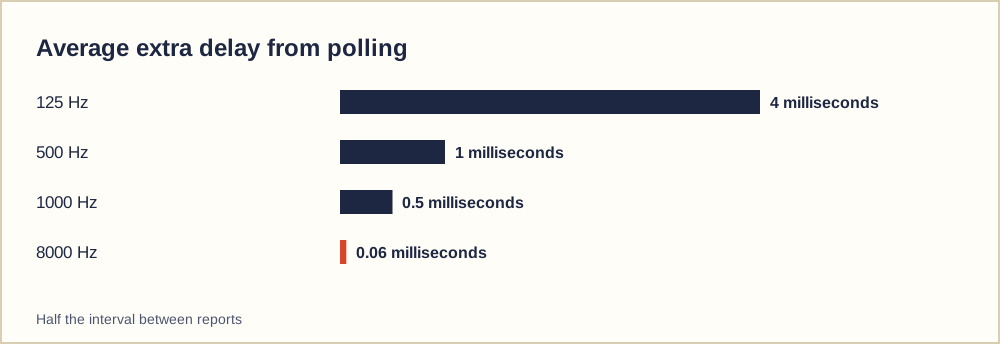
A click that happens just after a report has to wait until the next one. On average, that wait is half the gap: about 4 milliseconds at 125 Hz and half a millisecond at 1000 Hz.
Does polling rate change CPS scores?
For click speed tests, almost not at all. Even at 125 Hz the mouse reports 125 times a second, far more often than anyone can click. Clicks that happen between reports are still reported, just slightly later. Your CPS score depends on your fingers, the switch and debounce, not on polling rate.
Polling rate matters more for responsiveness: how quickly a click or movement appears on screen. In fast competitive games, a few milliseconds can feel noticeable to experienced players, especially for pointer movement.
The whole latency chain
Polling is one link in a longer chain. A click passes through the switch, debounce, the mouse's processor, the USB or wireless connection, the operating system, the game or browser, and finally the display.
From finger to screen
- Switch actuates
- Debounce and mouse firmware
- Polling and USB or wireless
- Operating system and application
- Display refresh
The display often adds more delay than the mouse does. A 60 Hz screen refreshes every 16.7 milliseconds; a 144 Hz screen every 6.9 milliseconds. Upgrading the display can make a bigger difference than raising polling rate beyond 1000 Hz.
Trade-offs of very high polling rates
Polling at 4000 or 8000 Hz asks more of the computer, because it must process many more updates per second. On some systems this raises processor load, and some older games behave oddly with very high rates. Wireless mice may also use more battery at higher rates.
For most people, 1000 Hz is a sensible default. Higher rates can help on high-refresh displays with a powerful computer, but the improvement is small.
Choosing a polling rate
- 1000 Hz is a good default
- Try higher rates only on high-refresh screens
- Watch for stutter or high CPU use
- Lower the rate on battery-powered wireless mice if needed
- Do not expect CPS scores to change
Wireless mice
Modern wireless gaming mice can match wired mice for latency and support high polling rates. Bluetooth connections are usually slower and less consistent than a dedicated wireless receiver, which is why gaming mice tend to include their own receiver.
Checking your current polling rate
If your mouse has companion software, the polling rate is usually shown on its performance or settings page. Some mice also have a small button underneath that cycles through rates, often with a light that changes colour. Without software, online pointer-rate testers can estimate the rate by measuring how often movement events arrive while you move the mouse in circles.
When you compare rates, move the mouse steadily rather than flicking it. Browsers sometimes combine pointer events, so a tester may report a lower number than the mouse really sends. Treat the result as a rough check rather than an exact measurement.
Wireless, Bluetooth and battery life
Wireless gaming mice with a dedicated receiver usually support 1000 Hz, and some support higher rates. Bluetooth connections tend to run at lower rates with less consistent timing, which is fine for office work but less suited to fast games. Higher polling rates draw more power, so a wireless mouse may last noticeably longer on a charge at 500 Hz than at 4000 Hz. If battery life matters more than a fraction of a millisecond, a moderate rate is a sensible choice.